Manufacturing Operating System
Track machines, resources, consumables, processes, and stock - all feeding directly into CPQ pricing.
MOS is the operational backbone that connects your shop floor to the CPQ pricing engine. It models every element of your manufacturing operation - machines, resources, consumables, processes, and stock - so that every quote reflects real production economics instead of static rate tables.
Key capabilities
Everything MOS adds to your Kabaido CPQ platform.
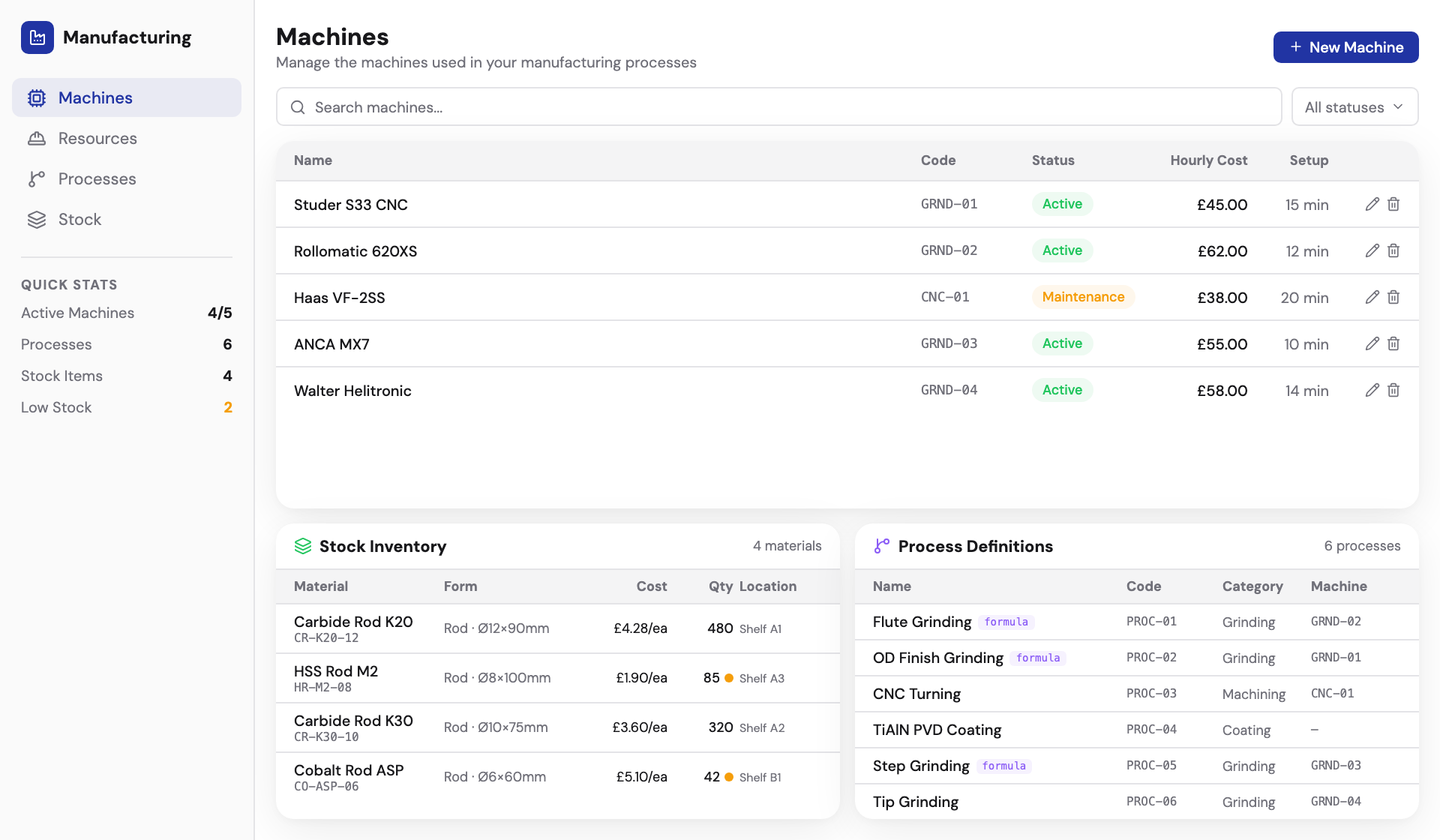
Machines
Define every machine on your shop floor - CNC lathes, grinders, coating chambers, EDM - each with hourly rates, capacity, and utilisation data that feeds directly into quote pricing.
Resources
Track labour, operator skills, and shift patterns. Resources are optional - if you just want per-machine rates, skip this. If you want full cost allocation, resources give you operator cost-per-hour factored into every quote.
Consumables
Coolant, grinding wheels, inserts, abrasives, coating chemicals - everything that gets consumed during production. Track cost-per-unit so quotes reflect actual consumable spend, not estimates.
Processes
Define the operations that combine machines, resources, and consumables to transform raw material into finished goods. Each process has time estimates, sequencing, and cost calculations.
Stock & inventory
Track raw material stock levels, finished goods, and reorder points. Material costs update automatically as stock prices change, so quotes always reflect current costs rather than outdated spreadsheet values.
Custom job builder
MOS adds a build-custom-job button directly in the quote area. Products are configured using the fundamental MOS structure - not just template configurators - giving you full control over the manufacturing cost model.
The MOS formula
Every element that costs money on your shop floor gets a data model in MOS - and feeds directly into CPQ pricing.
Resources and consumables are optional - define per-process/machine rates if that's all you need.
CPQ without MOS vs. with MOS
The core CPQ works well with static settings. MOS upgrades it to live operational data.
Static pricing settings and manual rate tables
Dynamic pricing from real machine rates and process data
No material stock or inventory tracking
Full stock inventory with live material costs
Simplified cost calculation with fixed rates
Granular cost breakdown: setup, cycle, consumable, overhead
Manual product costing outside the platform
Custom job builder with MOS structure in the quote area
Deep dive
What MOS does
MOS models your manufacturing floor digitally. It tracks machines (CNC lathes, grinders, coating chambers), resources (labour, shifts, operator skills), consumables (coolant, grinding wheels, inserts, abrasives), and processes (the operations that combine machines, resources, and consumables to transform raw material into finished goods). Everything that costs money on the shop floor gets a data model in MOS.
The MOS formula
((Machines + Resources + Consumables) × Processes) + Stock = Products. Each element feeds into cost calculation. Machines have hourly rates and capacity. Resources have cost-per-hour. Consumables have cost-per-unit. Processes define the sequence that transforms raw material into finished goods. Stock provides the raw material cost baseline. Together they produce a fully-costed product.
Stock and inventory tracking
Track raw material stock levels, finished goods inventory, and reorder points. Stock feeds into availability checks during quoting - know what materials are on hand versus what needs to be ordered. Material costs update automatically as stock prices change, so quotes always reflect current costs rather than outdated spreadsheet values.
Machine and process management
Define your shop floor: CNC machines, grinders, coating chambers, EDM machines - each with hourly rates, capacity, and utilisation data. Processes link machines to operations with time estimates and sequencing. When a quote requires a 5-axis milling operation followed by TiAlN coating, MOS knows exactly what that costs based on real machine data.
How MOS connects to CPQ pricing
Without MOS, the CPQ uses static pricing settings - fixed rates, manual cost tables, and simplified markup rules. With MOS, pricing becomes dynamic. Real machine rates, actual resource costs, and live consumable prices feed directly into the pricing engine. The quote reflects actual shop economics: setup time, cycle time per operation, tooling wear, and overhead allocation.
Frequently asked questions
Other platform modules
Get started with Manufacturing Operating System
Talk to us about adding MOS to your Kabaido CPQ platform. We'll walk you through the setup and show you how it fits your workflow.